Gate git, az, and docker
When: The harness runs git push, az …, or docker … and you want those invocations mediated (approve/deny by launcher), even if CmdWarden does not own the ambient credential store.
cw harden git
cw harden az
cw harden docker
# open a new shell, then use tools via PATH
where.exe git
where.exe az
where.exe docker
cw harden --list shows the state of every catalog tool:
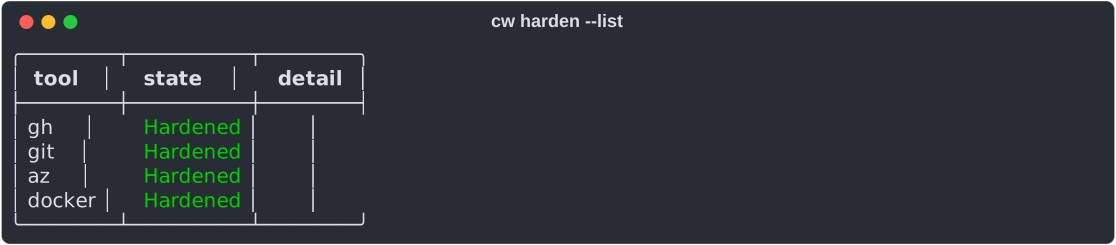
Expect: PATH shims installed; no automatic vault import for git/az (GCM / MSAL stay). Docker optional: if you already cw save DOCKER_AUTH_CONFIG, child may get that on allow.
| Tool | Harden does | Day-to-day secret behavior |
|---|---|---|
| gh | Pin + shim + import GH_TOKEN into Vault | Child gets GH_TOKEN when allowed |
| git | Pin + shim | Gate only; GCM / helpers still ambient |
| az | Pin + shim | Gate only; MSAL ~/.azure still ambient |
| docker | Pin + shim | Gate; optional vault DOCKER_AUTH_CONFIG if you saved it |
Strong mode for docker
When: You want Docker registry credentials out of the Docker Desktop / wincred store and behind the Approval Gate.
cw harden docker --strong
cw doctor
cw unharden docker
Expect: --strong moves every Docker Credentials entry and every inline auths value into the vault, erases the originals, and sets credsStore to cmdwarden in config.json. docker pull and docker login then talk to docker-credential-cmdwarden.exe, which asks the Session Agent. A different value already in the vault stops the harden before any change. Foreign credHelpers (for example gcloud) stay and print a warning. cw doctor shows Hardened (strong - N registries in vault); it shows Degraded when Docker Desktop rewrites credsStore or a legacy entry returns, and cw harden docker --strong repairs both. cw unharden docker writes the entries back, restores credsStore, and removes the pin, shim, and helper.
Strong mode for gh
When: You want every gh token out of the stock gh store and behind the Approval Gate, absolute-path gh included.
cw harden gh --strong
cw doctor
cw unharden gh
Expect: --strong moves every stock entry (gh:<host>:<user> in Credential Manager, oauth_token lines in hosts.yml) into the vault as CmdWarden/gh/<host> and CmdWarden/gh/<user>@<host>, verifies each token with the real gh, then erases the originals. hosts.yml keeps the user list, active user, and git_protocol. gh pr list through the shim gets GH_TOKEN for github.com and GH_ENTERPRISE_TOKEN for the one GHES host, or the host --hostname, -R host/owner/repo, or GH_HOST names. gh auth login through the shim lands in the vault; absolute-path gh auth token reports not logged in. cw doctor shows Hardened (strong - N hosts, M accounts in vault); it shows Degraded when a stock entry returns or a host has no vault token for its active user. cw unharden gh writes the entries back and removes the pin and shim; the compat GH_TOKEN stays. Known limit: gh auth switch reads the stock store and fails in strong mode; log in again through the shim instead.
Strong mode for git
When: You want Git HTTPS credentials out of Git Credential Manager and behind the Approval Gate.
cw harden git --strong
cw doctor
cw unharden git
Expect: --strong moves every GCM entry (git:* in Credential Manager) into the vault, erases the originals, and makes git-credential-cmdwarden.exe the only global credential.helper. Host-scoped helper lines from gh auth setup-git are saved and removed. The harden stops before any change when credential.credentialStore is dpapi or plaintext, when ~\.git-credentials exists, or when the vault holds a different value. cw doctor shows Hardened (strong - N git hosts in vault); it shows Degraded when the helper list changes, a gh helper line returns, or a GCM entry returns, and cw harden git --strong repairs all three. cw unharden git restores the helper lines, writes the entries back to GCM, and removes the pin, shim, and helper.