How CmdWarden works
Your AI harness can run shell commands. Those commands can call gh, git, az, or docker with your credentials - list private repos, open PRs, push code, talk to cloud APIs. Without a gate, anything that can spawn a process on your machine can often use the same tokens your terminal already has.
CmdWarden sits between the launcher (terminal or AI harness) and the hardened tool:
- You enroll which launchers you trust, and how much.
- You harden tools so PATH hits a Shim that asks the Session Agent first.
- Secrets leave the Vault only into the child process for that run (when policy allows), not into every agent session forever.
- When policy is unsure, you get an Approval Gate (Allow once / Deny). If the UI cannot show, the request fails closed.
Install is binaries only. Day-to-day you still type gh and git as usual after setup.
CmdWarden has three user surfaces:
| Surface | What it is | When you see it |
|---|---|---|
cw CLI |
Setup and power-user commands | You type them in a terminal |
| Approval Gate | Small desktop card with Deny (Esc) / Allow for session (A) / Approve Once (Enter) | Pops up while a gated command waits |
| CmdWarden Vault | Desktop app with six pages: Secret Gates, Detectors, Hardened Tools, Secrets, Secret Usage, Doctor | You open it from the Start Menu |
The CmdWarden Vault section describes every page. Each use case below names the Vault page that shows the same information.
Concepts
| Idea | Plain meaning |
|---|---|
| Session Agent | Background process per user that evaluates policy and can show the Approval Gate |
| Launcher | Who started the tool (terminal vs AI harness), from the process chain |
| Enroll | Register a launcher as terminal or ai-harness so defaults apply |
| Harden | Opt-in: pin real binary + PATH shim (+ vault token for gh) |
| Policy level | Deny / Read / Trusted / Full for a tool × launcher pair |
| Approval Gate | Desktop Deny / Allow for session / Approve Once card when auto-allow does not apply (appears while the agent tool call waits) |
| Vault | Secrets in Windows Credential Manager, released only to allowed children |
| CmdWarden Vault | Desktop app (Start Menu) to view gates, detectors, hardened tools, secret names, usage, and doctor |
| Session allow | An Approval Gate grant that lasts until the launcher exits or 60 idle minutes. Approve Once grants the one class you saw; Allow for session grants that class and every lower one. Allow for session can also end after 10 minutes or 1 hour |
Enrollment is by identity key from cw whoami, not by brand name. Cursor, Claude Code, Codex, and Grok are examples of the ai-harness kind - same enroll commands for each.
cw whoami prints the identity CmdWarden sees for the current shell:
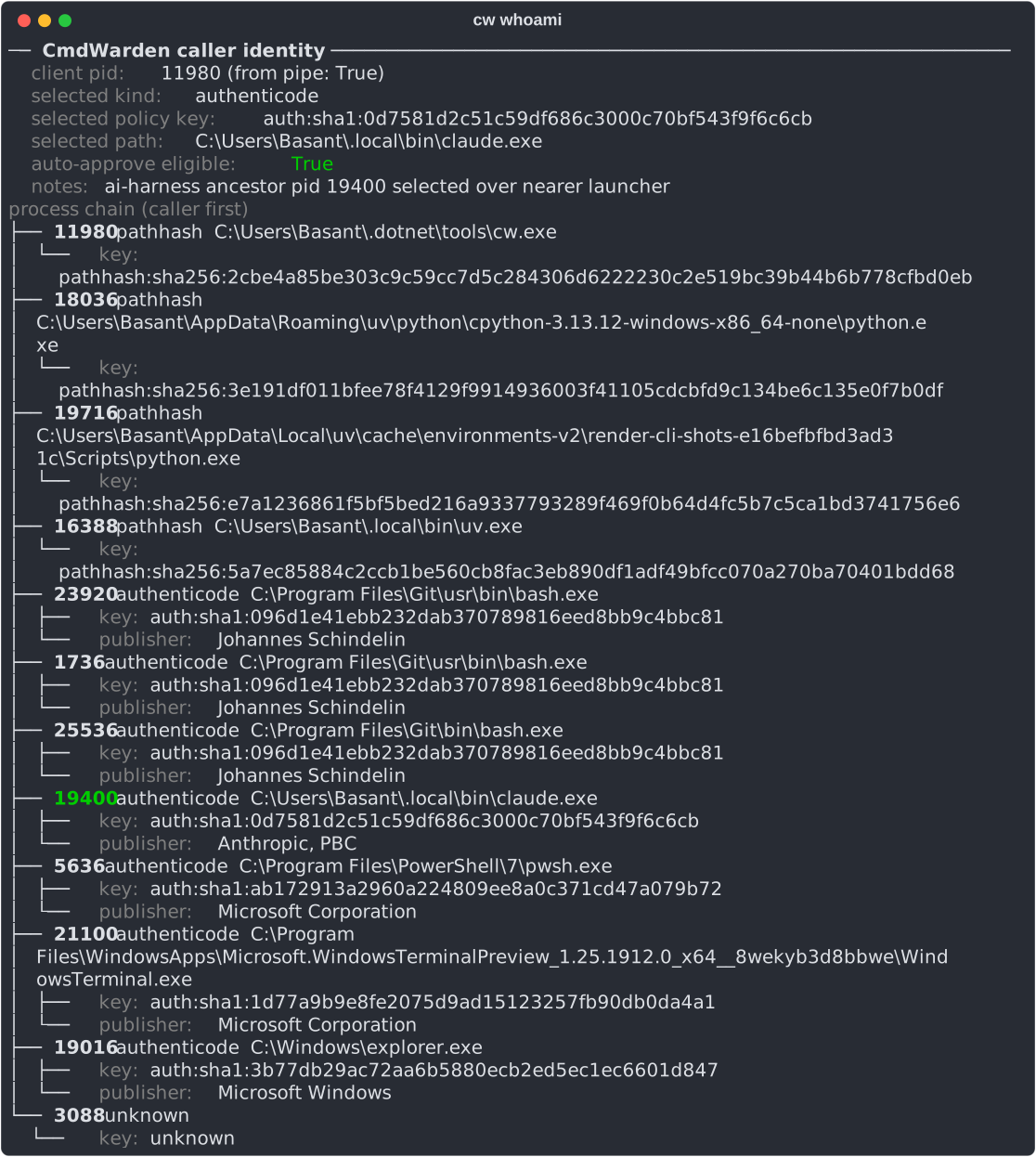
Escape if whoami is wrong or unknown:
cw policy enroll --kind ai-harness --key <policyKey>
Agent lifecycle:
cw doctor
cw agent start
cw agent status
cw agent stop
Many commands lazy-start the agent; prefer cw doctor after install.
Day-to-day
- Use
gh/git/ … via PATH in a new shell after harden (not absolute path to the real binary - that bypasses the shim). - Work normally. When the Approval Gate appears, click Approve Once, Allow for session, or Deny.
- Let the agent say why it runs a command. Set
CW_REASONfor the command, for exampleCW_REASON="create the release PR" gh pr create. The Approval Gate shows the text under the command, with the label The agent says:. The audit stores it. CmdWarden never treats it as proof, and policy never reads it. The text is one line of 200 characters or less. A request through the placeholder proxy sends the same text in theX-CmdWarden-Reasonheader (UC15). - Stop an agent before it runs a command that CmdWarden will deny. Run
cw hook install claude,cw hook install cursor,cw hook install codex, orcw hook install grokonce. After you deny a tool, the agent gets the deny before the next try, and not a failed command. For Grok, the hook file is~/.grok/hooks/cmdwarden.json. - Give the agent the CmdWarden MCP server with
cw mcp install claude,cw mcp install cursor,cw mcp install codex, orcw mcp install grok. The agent can then see what runs with no prompt, run a command that needs a vault secret, and learn why CmdWarden denied a call. No secret value goes back to the model. For Grok, the server is[mcp_servers.cmdwarden]in~/.grok/config.toml. - Tighten with
cw policy setonly when defaults are not enough (UC3). - Periodically open CmdWarden Vault (Detectors, Secret Usage) or run
cw scan/cw audit(UC7).
Secrets reminder:
- Track A (preferred for gh): harden owns
GH_TOKENin the Vault; child-only release. - Track B:
cw save/inject/delete, or the Vault Secrets page, for named one-shot secrets (UC5, UC9). - Web sign-in for an agent: the agent types
cw://NAMEin a sign-in form, and the proxy fills the real password after the card (UC17). - Not for this: autofill of your own browser passwords, full keychain UI, enterprise cloud secret managers.